Description
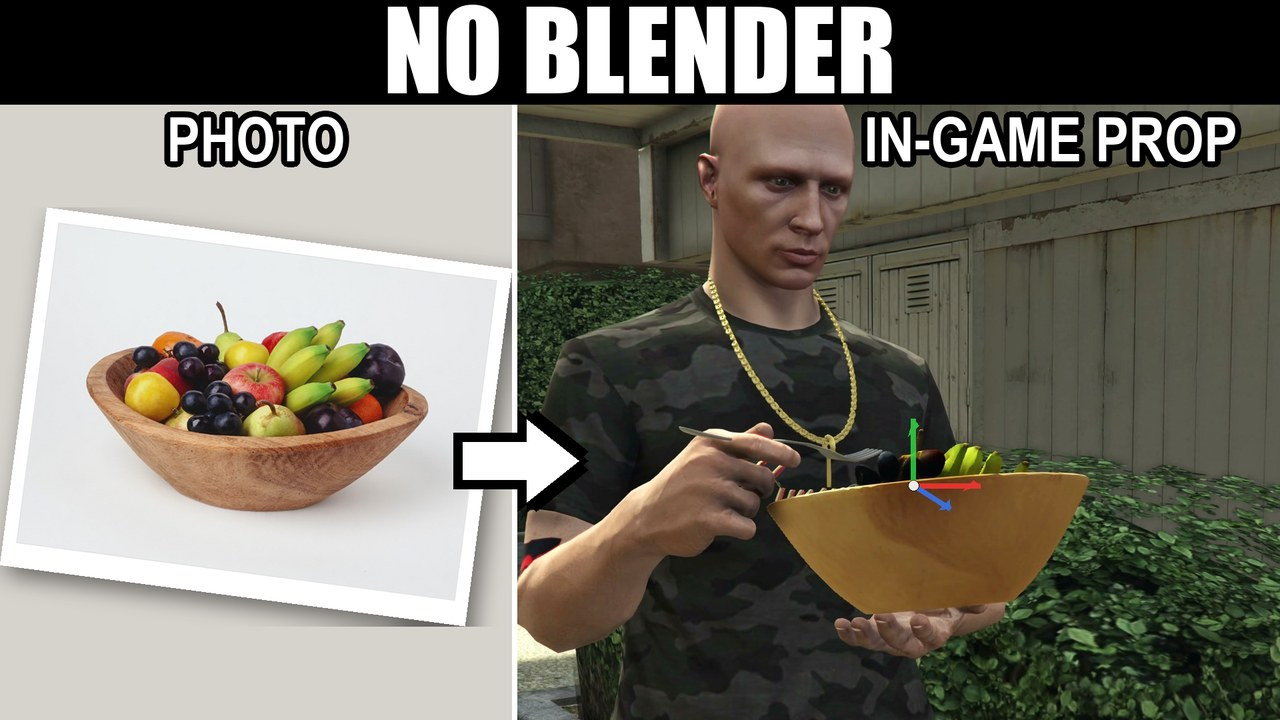
Turn any photo into a real FiveM prop in-game — no Blender, no CodeWalker. It removes the background, detects the shape and writes the .ydr for you. Food, signs, usable items and decor, in minutes.
📝 Note: to unlock the full feature set — Make it 3D and AI background removal — register at fal.ai and add your own API key (pay-as-you-go, about $0.02 per 3D prop). Everything else works out of the box. Watch the 2-minute setup guide.
✅ Works with your server
Frameworks: Standalone · ESX · QBCore · Qbox. Gate it by ace permission, or let your framework's admin groups in automatically.
Inventories — the item config is written for you: ox_inventory (also Qbox, qs-inventory, tgiann-inventory) · qb-smallresources (also ps, lj, codem) · esx_basicneeds · ak47_inventory · jim-consumables / rpemotes · boii-consumables. No inventory at all? Every pack ships its own /hold runtime.
🎯 What you'll make with it
🍔 Food for every restaurant on your server — a menu photo becomes a plated special your players can actually hold and eat, instead of the same three burgers every server has.
🪧 A business's own branding, on their own wall — drop in a shop's logo PNG and it becomes a sign. Place it with FiveM's gizmo, press ENTER, and it's written into the map: up for everyone, still there after a restart, with no script running.
🎒 Whole sets of usable items — bags, bottles, packets, tools. Build a full set from photos in one sitting, and the config for your inventory comes out ready to paste.
🏺 Decor and map props that aren't flat — a side-on photo of a cone, bottle, can or barrel comes out round, turned on a real lathe. Not a cut-out with thickness bolted on.
⚡ How it works
- Drop a photo in — drag it onto the editor, paste with Ctrl+V, or pick it from your server's
import/folder. - The background comes off by itself — a segmentation model ships inside the resource and runs offline in about a second. A white bowl on a white table cuts out properly.
- It tells you what the object is — a "Looks like…" card names the shape, gives a confidence figure and explains why in plain English.
- Spawn Live — the real model stands in front of you in seconds. No export, no server restart, nobody disconnected.
- Place it or hold it — stand it in the world with FiveM's own gizmo, or put it in your character's hand against a real animation.
- Build Pack — one click, one finished resource, ready to
ensure.
🔥 Features
- 🧱 Writes the model files itself — the
.ydrdrawable, the.ytyparchetypes, and a.ymapfor anything you placed. This is the part every other workflow sends you to Blender and CodeWalker for. - 🔷 Five shape modes — Flat (signs, logos, decals), Extrude (the default, right for almost everything), Relief (sculpted depth from the picture), Box (crates, packets) and Turned (a real lathe).
- 🔎 Shape detection that knows its limits — it offers Turned only when an outline really is symmetric, and refuses shapes a lathe can't make.
- 🎈 Solid props, not slabs — choose what the back does: Mirrored, Solid, or Flat-backed for anything against a wall.
- 🤖 Make it 3D — send a photo to an image-to-3D model and get the whole object back, including the sides the picture never showed. Or skip the photo and drop in a
.glb,.gltfor.obj. - 🖐️ Refine the cut-out by hand — wipe, brush, heal, layers, undo/redo, then the mesh rebuilds.
- 👁️ Live 3D preview of the actual mesh — orbit, wireframe, a half-metre grid and a 1.8 m reference figure beside your prop.
- ✋ In the hand — seven static hold poses (box carry, plate, clipboard, cup, phone, bag, small item) plus eating and use poses.
- 🍴 Fork eating animation — animation packs you own show up as poses, e.g.
alca_anim_eat: its fork goes in one hand automatically and your food in the other. - 🛡️ Collision per prop — Solid box, Exact shape (walk through the hole in a doughnut), or Walk through for flat signs.
- 📏 Real-world sizing — size and thickness in metres, pivot at centre or base, and a draw-distance slider.
- 📦 Build Pack — up to 256 props in one resource, with the
fxmanifest.lua, the hold runtime and a README of every model name. - 💾 Save and reopen projects, and a guided tour the first time anyone opens the editor.
- 🔒 Locked down — ace-permission gated.
🆚 Why not a prop pack, or a browser prop tool?
| Other options | LMX Prop Creator |
|---|---|
| A prop pack gives you someone else's props — the same ones every server has | Unlimited props, made from your own photos |
| Browser tools build in a tab, then you install and go test it | Built inside your server, standing in front of you in seconds |
| Browser tools charge a monthly subscription | One-time purchase, yours to keep |
| You place props somewhere else, in another tool | Place them in-game with FiveM's gizmo — the pack writes the .ymap |
| Making a prop usable means hand-writing inventory config | Config for six inventories written for you, plus /hold |
| A photo of a cone gets you a flat picture of a cone | A round cone |
📋 Before you buy — the straight answers
- Two folders, both ensured —
lmx_propcreatorand the includedlmx_prop_livecompanion. Without the companion, Spawn Live falls back to a flat preview; everything else still works. - Spawn Live needs no restart. Installing a built pack needs one full server restart — that's how GTA registers new archetypes.
- Spawn Live previews are visible to you only. Build Pack and its
.ymapare what put a prop in front of everyone, permanently. - Background removal is built in, free and offline. The optional AI background removal and Make it 3D run on your own fal.ai key: about 1 cent per image and about $0.02 per 3D generation. Both are off until you add one line to
server.cfg, and neither is included in the price. - Shape detection suggests; you decide. Out of the box it reads the outline and never applies a shape for you. Host the optional depth model (not bundled, about 20 minutes, guide included) and detection measures real depth and applies itself.
- A prop built from one photo has an assumed back. Mirrored, Solid and Flat-backed cover most things; Make it 3D is the route to the object's true back.
📦 What's included
lmx_propcreator— the in-game editor, cut-out engine, shape detector, 3D preview and pack exporterlmx_prop_live— the companion that powers Spawn Live- The bundled offline background-removal model
- Hold runtime and ready-to-paste config for six inventories
- Commented
config.luaand opendata/files. Server and client Lua are protected by the asset escrow system. - Full documentation, including the optional depth-model hosting guide
🛠️ Support
📖 Documentation: lmx-development.gitbook.io — including the 2-minute Make it 3D key setup video
💬 Discord support: discord.gg/6cCcjfGBNQ
Built by LMX Development — 500+ paying customers across 20+ FiveM scripts.
LMX Prop Creator | Custom FiveM Props From Any Photo | Food & Item Creator | 3D Signs
Checkout signs you in with your Cfx.re (FiveM) account once — that's how the script gets licensed to your Keymaster.